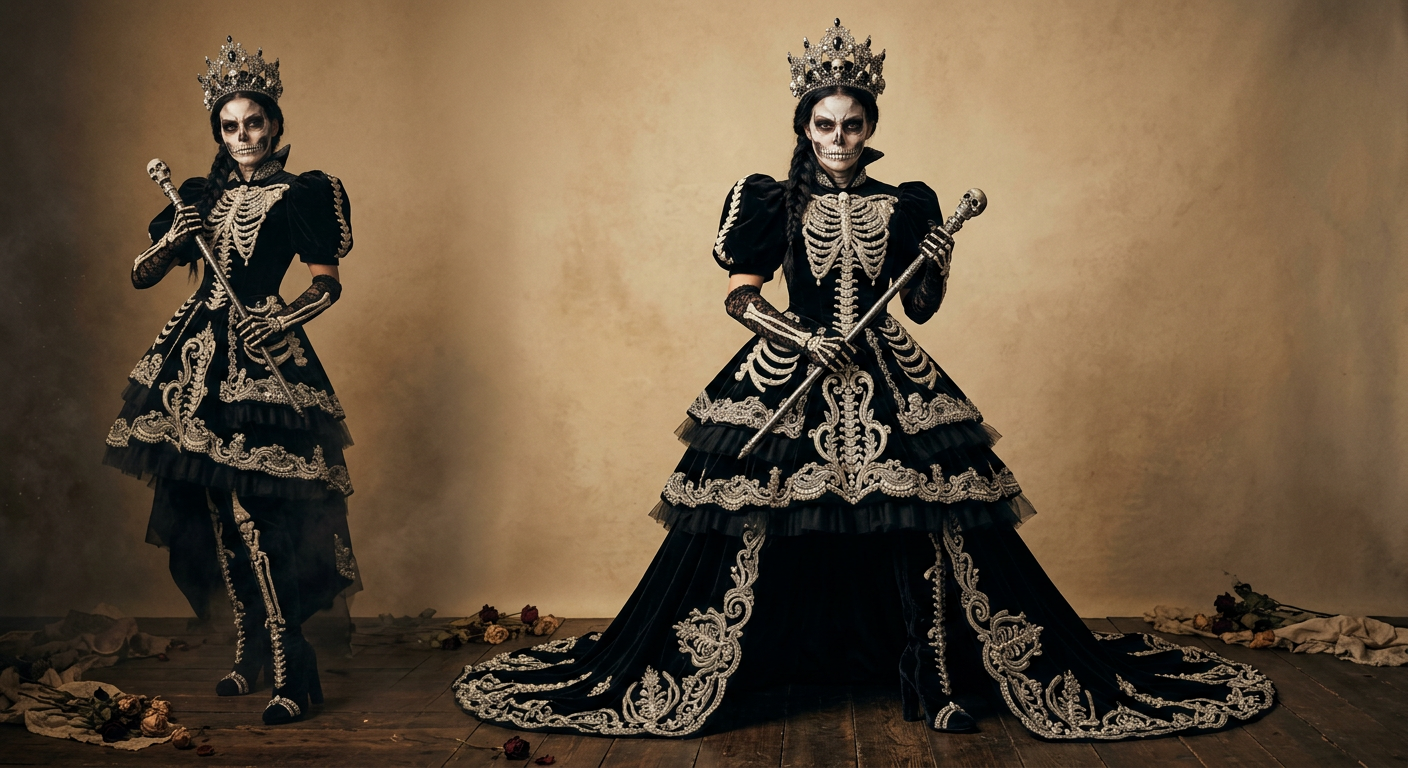
AI Halloween Costume Generator: Create a Halloween Costume From Your Photo Online
Use an AI Halloween costume generator to turn one portrait into a styled Halloween look, then animate it into a short video. Learn how the Halloween costume generator on Nano-video works, which photos perform best, and why this workflow is ideal for fast Halloween content.
Overview
An AI Halloween Costume Generator gives creators a much faster way to make seasonal content than planning a full shoot, renting costumes, or editing together multiple mobile apps. Instead of building the look by hand, you upload one portrait, choose a themed template, and let the model create a finished Halloween makeover in seconds.
On Nano-video, this workflow lives on the dedicated AI Halloween Costume Generator landing page. It is built for a very specific job: turn one photo into a Halloween costume portrait, then turn that portrait into a short vertical video for TikTok, Reels, and Shorts.
If you are searching for an AI Halloween costume generator from photo, Halloween costume generator online, or AI Halloween costume video generator, this guide explains what the tool actually does, how to get cleaner results, and why a structured workflow beats generic prompt-only tools for seasonal content.
What an AI Halloween Costume Generator Actually Does
The phrase sounds broad, but in practice users usually want four things:
- Upload a real selfie or portrait.
- Apply a full Halloween outfit and styling package.
- Keep the face recognizable.
- Export a social-ready image or video without manual compositing.
A strong Halloween costume AI workflow is not only swapping clothes. It also has to carry over makeup, mood, accessories, lighting cues, and the overall character logic of the selected costume.
That is why the AI Halloween Costume Generator on Nano-video is structured around one-photo input plus a costume reference template. The user is not guessing how to write a complicated transformation prompt from scratch. The page already narrows the job to a clean Halloween makeover pipeline.
Why This Format Works for SEO and Social Content
Halloween content performs well because the intent is unusually clear. Users are typically looking for one of these outcomes:
- a fast Halloween costume generator from photo
- an AI Halloween costume maker for social posting
- a virtual Halloween costume try on workflow
- a way to turn a costume portrait into a short Halloween AI video
That demand maps cleanly to a product page and an explainer article. The blog captures informational search intent, while the Halloween costume generator landing page converts visitors who are ready to try the tool immediately.
From an SEO perspective, this also creates a strong internal path:
- blog article for discovery
- product landing page for action
- pricing or checkout flow for conversion
AI Halloween Costume Generator From Photo: How the Workflow Works
The Nano-video flow is intentionally simple.
1. Upload one photo
Start with one clear portrait. A front-facing image with visible facial features works best because the model needs stable identity cues before it applies the costume transformation.
2. Pick a Halloween costume template
Choose a look from the themed template library. This is the key step that makes the experience feel more reliable than a generic text prompt. Instead of vaguely asking for "witch makeup and dramatic costume," you give the model a strong visual reference.
3. Generate the costume portrait
The system creates a new image where the person in your uploaded photo wears the selected Halloween styling. A good AI Halloween costume generator from photo keeps the person recognizable while transferring the costume logic from the template.
4. Turn the image into a video
After the portrait is created, you can continue on the same AI Halloween Costume Generator page and animate it into a short vertical clip. This is especially useful for creators making last-minute seasonal videos for social platforms.
Best Use Cases for an AI Halloween Costume Generator Online
This kind of product is useful far beyond casual selfies.
Social creators
Creators can batch-test multiple Halloween looks without doing multiple makeup sessions or wardrobe changes. That makes an AI Halloween costume generator online practical for Shorts, Reels, TikTok, and story content.
Couples and friend campaigns
A creator can run several themed looks quickly, compare performance, and publish the most clickable costume style first. For broader motion workflows, Nano-video also supports image to video and text to video creation.
Seasonal ecommerce and promotions
Boutiques, beauty brands, event pages, nightlife promotions, and haunted attractions can use a Halloween costume photo generator to build fast ad creatives around October campaigns.
Last-minute party planning
For users who need a visual idea before buying or assembling a costume, an AI costume changer works as a rapid preview tool. You can test a witch, vampire, gothic, pumpkin, or fantasy look from a single portrait before committing to the real outfit.
What Makes a Good AI Halloween Costume Generator
Not every tool that claims to do AI costume changes is equally usable. The strongest experience usually has these traits:
- Reference-guided transformation: the costume style comes from a real template, not only a loose prompt.
- Face preservation: the output still looks like the original person.
- Fast vertical output: the result is usable for social immediately.
- Simple UI: upload, choose, generate, download.
- Video extension: the still image can continue into motion.
That last point matters. Many tools stop at the image stage. The Halloween costume generator on Nano-video continues from photo transformation into short-form video, which is a better fit for current seasonal content demand.
Tips to Get Better Results
If you want your AI Halloween photo to look cleaner, these details matter:
Use a clean portrait
Avoid group photos, sunglasses, low light, and heavy beauty filters. A direct portrait gives the model more stable identity data.
Match the costume mood to the face
Some templates look better with neutral, confident, or dramatic portrait expressions. If the face angle is too extreme, ornate costume details may look less natural.
Keep the frame simple
A centered or lightly angled portrait usually works better than a distant full-body scene for this kind of Halloween makeover AI workflow.
Test more than one style
The best Halloween costume generator online strategy is often variation, not perfection on the first try. Run multiple costume directions and pick the one that reads best on mobile.
Long-Tail Keyword Matches This Article Intends to Serve
This guide is designed to match users looking for:
- AI Halloween Costume Generator
- AI Halloween Costume Generator from photo
- Halloween costume generator online
- Halloween costume generator from photo
- AI Halloween costume video generator
- virtual Halloween costume try on
- Halloween costume AI
- AI Halloween photo generator
- Halloween costume maker 2026
Those phrases all point to the same core problem: users want a fast way to visualize a Halloween look from a real photo and turn it into content worth sharing.
Why a Dedicated Landing Page Converts Better
A blog article can explain the use case, but the landing page needs to do the conversion work. That is why this article keeps linking back to the dedicated AI Halloween Costume Generator page.
The landing page is where users can:
- upload one portrait
- pick from Halloween costume templates
- generate a finished costume image
- animate the result into a short video
- buy without a long signup flow
For high-intent visitors searching terms like free Halloween costume generator, Halloween costume app, or AI Halloween costume generator online, that tighter action path matters more than a generic multi-tool editor.
Frequently Asked Questions
What is an AI Halloween Costume Generator?
It is a tool that turns a portrait into a Halloween-themed costume image using AI, often with styling such as outfits, makeup, props, and mood lighting.
Can I make a Halloween costume from one photo?
Yes. On the AI Halloween Costume Generator, the workflow starts with one uploaded image and one selected costume template.
Is this a Halloween costume generator from photo or from prompt?
It is primarily a Halloween costume generator from photo because your portrait is the identity anchor, while the template controls the look and styling.
Can I also create a video?
Yes. After generating the costume portrait, you can continue on the same Halloween costume generator page and turn the image into a short vertical video.
Who should use an AI Halloween costume generator online?
Creators, brands, event marketers, partygoers, and anyone who wants a fast visual preview or a quick Halloween social asset.
Final Take
An AI Halloween Costume Generator is one of the cleanest seasonal AI use cases because the user intent is obvious, the visual transformation is easy to understand, and the output is naturally shareable. The best version of the workflow is not just "put a costume on a photo." It is a focused pipeline that starts with one portrait, applies a strong Halloween template, and optionally extends the result into video.
If your goal is to create a Halloween costume from photo online, test different looks quickly, or produce a short AI Halloween costume video generator style clip for social, the fastest place to start is the dedicated AI Halloween Costume Generator on Nano-video.
Related Reads
- Want a broader motion workflow after the costume image is ready? Try the image to video AI workspace.
- Need a general prompt-first workflow for other concepts? Use text to video.
- Looking for another story-driven seasonal format? See the Zombie Love Story AI Video Generator guide.
Author

More Posts

Veo 3.1 AI Video Generator Guide: Native Audio, 4K Output, and Fast-to-Quality Workflow
Veo 3.1 is Google's AI video generator with native audio, 4K output, and two modes — Fast for quick iteration and Quality for polished final renders. Learn how to use it on Nano-video.

Seedance 2.5 Feature Guide: 30s Generation, 4K Output, and Local Redraw
Seedance 2.5 supports 30-second generation, native 4K 10-bit output, up to 50 reference assets, and local redraw for commercial video workflows.

Nano Banana Pro AI Image Generator Guide: High-Resolution Output, Multi-Image Batches, and Commercial Workflows
Nano Banana Pro is a high-fidelity AI image generator with 1K/2K/4K output, multi-image batch generation, and accurate text rendering. Learn how to use it on Nano-video's AI Image workspace.
Newsletter
Join the community
Subscribe to our newsletter for the latest news and updates